Monday, 31 March 2014

Another Maya Mel Script

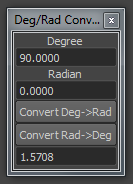
This time it is a little Mel script to convert degrees to radians or radians to degrees.
Of course maya have a embed procedure for that but it is much more efficient to have a mini interface to do the math and past result in the clipboard.

[Download]


Monday, 17 March 2014

Third Player Controller Part02 (Unity) (Update 26/03)

Hi everybody,

Last few days I started to re-do some stuff on my TP Controller.

I entirely recode the camera occlusion/collision and lock system.
And add some improvement to the  rest of the code.

I also intend to redo the character rig and animation before coding the main part of the climbing system. (The main goal of this project.)

I really think it is my biggest coding experiment and I learned a lot of things about C#, about coding in general and about myself, improve my technical skills and makes me happy to do something functional .

I will record a little video like the others to show the system in action.


So to update this article, I post today an image of the new IKFK Rig in Maya 2012.
(IKFK Arms, IK Legs and FK Spine)
I tried many IK spine solutions, but the IK spine with the advanced twist control in Maya destroy my IKFK arms and I don't know why, so I will use FK spine who is not so bad.
There is also driven keys on IK foot and FK fingers.

The character mesh and skinning are in progress. I will use a proxy style with non attached parts to simplify skinning and because it is not my main goal to have a complex character mesh to skin.

Monday, 10 February 2014

Scifi Elysium thermal grenade

Science fiction thermal grenade from Elysium. (Movie)
Original concept from Ben Mauro.
http://www.artofben.com


Final texture


Monday, 27 January 2014

Two new Unity plugins (WIP)

Hi everybody,

last few days I've been busy on a vertex paint plugin for Unity.
The UI is now ready, and I actually work on the brush tool.

I really would like to do a vertex painter tool like the one in the UDK.
This is a first screenshot,and in extra, a little script I did to calculate FOV from 3dsmax to Unity.


Saturday, 16 November 2013

My first Mel (Maya) script UPDATE(2/1/2014)

Hello everybody,

since a few days I've started to learn mel script for Maya,
and I would like to share my work in progress from my first script with the interface.

This is a script for exporting FBX for Unity, with some little options.
1.1) Select All(Geom) = select all geometry in the scene.
1.2) Clear selection = clear all selection in the scene.
2.1 and 2.2) Export selected and export all, are working with the bottom list.
3.1) Export objects centred to 0,0,0.
3.2) Export objects in separate files.
4.0) Add or remove items to the list, and clear all the list.

the script is still wip but the main functions behind buttons are almost finished.
I also think it's a very good start to learn an unknown programming language.

thanks for your support.

Update with some more buttons.
One to select object(s) in the scene from a selection on the bottom list,
two prefix and suffix export name options, and a refresh button to refresh list if you delete an object in the scene.

First final version. [Download].
It must be place in "C:\Users\UserName\Documents\maya\scripts"
This version save FBX(s) on the C drive.
To change that, change the line 230 : FBXExport -f ("c:/" + $vPrefix + $o + $vSuffix + ".fbx") -s;

For any problem, bug report, or implementation ideas, contact me by mail or just leave a comment.
lefebvrejonathan.pro@gmail.com

Happy new years.
Sunday, 22 September 2013

ZBrush Seamless textures rendering method

Hi,

I post today a little method I wrote, for ZBrush seamless sculpting and rendering.

Sometimes a little seam can happen, depending on the ZBrush matcap.


ZBrush
-------
1. Create a square document. 1024, 2048, ... exp2
2. Create a 3d plane and convert it to "Polymesh3D".
3. Divide it without smoothing.
4. Press "F" to frame the plane on the canvas.
5. Sculpt it with "wrap mode 1" on brush curve options. (For seamless sculpt.)
6. After sculpt and maybe polypainting, you can now render your seamless maps. (Diffuse, normal, etc)
7. In Render DeActivate "Shadows" on "Render Properties".
8. Activate Best render mode in top of render panel.
9. Do a "Best Preview Render"(BPR)
10. Export canvas image with ZapLink. (In "Document" panel. Before configure target app.)
(Ex: Photoshop)
11. Press "Drop Now".

Photoshop
----------
1. Do a an "Offset" and clean if needed.
Wednesday, 5 June 2013
My Portfolio

www.jonathanlefebvre.carbonmade.com

My CV

3D CG Artist (FR)
.Net C# Developer (FR)
 
Copyright 2014 Polygon Experiment