actually, and for my personal game project purpose,
I develop a custom event manager with delegates and events.
There are 4 parts :
the events manager
the events listener
the events trigger
the events scripts who are called by the events listener.
For the event trigger script, the user can choose when an action must be trigger and the action type.
For example, here I chose Start (like Awake, Update, ...) and the action is "Show Cursor Action".
Then you press the button add, and you add the action to the list below.
When you press the button, a method will verify if the chosen action must use some data models or not with some reflexion.
after some time, working on my own multi devices little game,
I come back with good news.
The character controller now work on Mobile with virtual input on screen, on Desktop with Keybord and/or GamePad and recently on PSVita trough the PSM.
(PS3/4 and XBox360/One devices are planned but I don't have yet any licences so I cannot test on it for the moment.)
I am actually working on the UI and this is a little harder than I expected. Update : A custom input manager is now implemented.
Last few days I started to re-do some stuff on my TP Controller.
I entirely recode the camera occlusion/collision and lock system.
And add some improvement to the rest of the code.
I also intend to redo the character rig and animation before coding the main part of the climbing system. (The main goal of this project.)
I really think it is my biggest coding experiment and I learned a lot of things about C#, about coding in general and about myself, improve my technical skills and makes me happy to do something functional .
I will record a little video like the others to show the system in action.
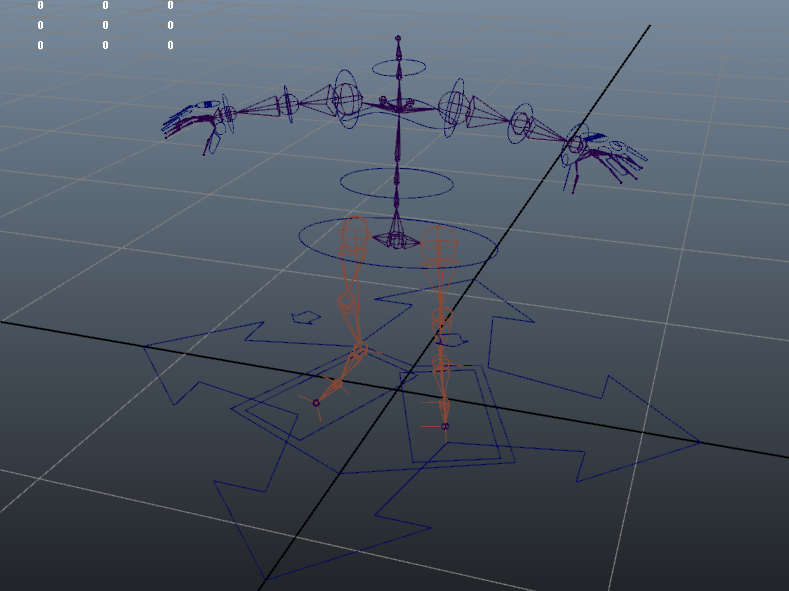
So to update this article, I post today an image of the new IKFK Rig in Maya 2012.
(IKFK Arms, IK Legs and FK Spine)
I tried many IK spine solutions, but the IK spine with the advanced twist control in Maya destroy my IKFK arms and I don't know why, so I will use FK spine who is not so bad.
There is also driven keys on IK foot and FK fingers.
The character mesh and skinning are in progress. I will use a proxy style with non attached parts to simplify skinning and because it is not my main goal to have a complex character mesh to skin.
last few days I've been busy on a vertex paint plugin for Unity.
The UI is now ready, and I actually work on the brush tool.
I really would like to do a vertex painter tool like the one in the UDK.
This is a first screenshot,and in extra, a little script I did to calculate FOV from 3dsmax to Unity.
To change of 3D modelling and increase my knowledge in C# for Unity,I started a new project of coding a Third Player Controller.
Of course the other projects are not cancelled but just in standby.
I must do other thing, and discover other things, than modelling and texturing.
I will detailed the project and the different steps to do or who are already done.
Update 03/06/2013
Second video of this project, with new floor :-), and the three animations. (Idle, Walk and Run)
The animations are, like I said quickly made, and I'm going to restart from the beginning with good timing and other animations for a good smooth blending between each anim.
Idle - Trot - Walk - Jog - Run - Sprint (Optional)
Update 05/06/2013
Hi everybody,
after some code revision for camera follow, the camera rotation around player works fine.
(With the right pad stick when the player don't move.)
So this is the 3rd video.
Update 06/06/2013
The code for the camera rotation up/down is now functional.
But it will be for the next video.
And this is a part of the code I use to rotate the camera around the center of the character.
The main function for rotations.(Changing world position of the camera.)
And to aim the good axis of the camera to the character, it is just a custom LookAt.
Update 15/06/2013
New updates for the next days.
- Improve movements with faked physics. (For falling and jumping) OK - Camera collisions/occlusion WIP
- Camera movements Up/Down lock.
Update 17/06/2013
After some search and some headaches about camera collision detection and occlusion,the system I made, with five Raycasts from player head to the camera, work but there are still some problems that I really don't know how to fix.
After reading a chapter from Game Programming Gems book on camera occlusion,
I don't know if my system is the best I can use for this purpose.
In this book they talk about a sphere casting.
Theoretically, it's more easy with sphere.
So I will try with this system.
Update 15/12/2013
After six month doing other things, work among other things,
this is a little update of this project with working moving platforms.
And I began to work on the climbing system like Uncharted and other 3rd person games like that.
Today an update of my Unity Shader. (Made with Strumpy Shader Editor.)
Two version are available for now.
The first one without alpha, and the second with alpha. (Double sided for the alpha.)
The alpha must be in the alpha channel of the diffuse map.
Here are the options available for now.
Diff,Normal,Spec and Glow maps, flip green for the normal, specular strength and colour,
Specular power/Gloss, Glow strength, and clip alpha for the alpha version.
Maybe a gradient map will be available, but I don't really know how to do that. :(
Good afternoon.
PS: Some things are not working properly, so I will must re-work this sometime in the future, or try to redo the same things only in Cg script when I my knowledges in Cg will be better.
Yesterday, I've made a additional option for my simple NormalMap/Diff/Spec shader in Unity.
This is just a switch (-1 or 1) to can invert the green channel of the normal map.
(On case you don't want to invert channel on Photoshop. :) )
And I think, I'll make an option to increase or decrease the power of the normal map.
To continue this project,
I have tried the Strumpy Shader Editor for Unity.
(Shader editor like in UDK)
And this is that I managed to do.
(A Rock/Snow shader with an interactive mask.)